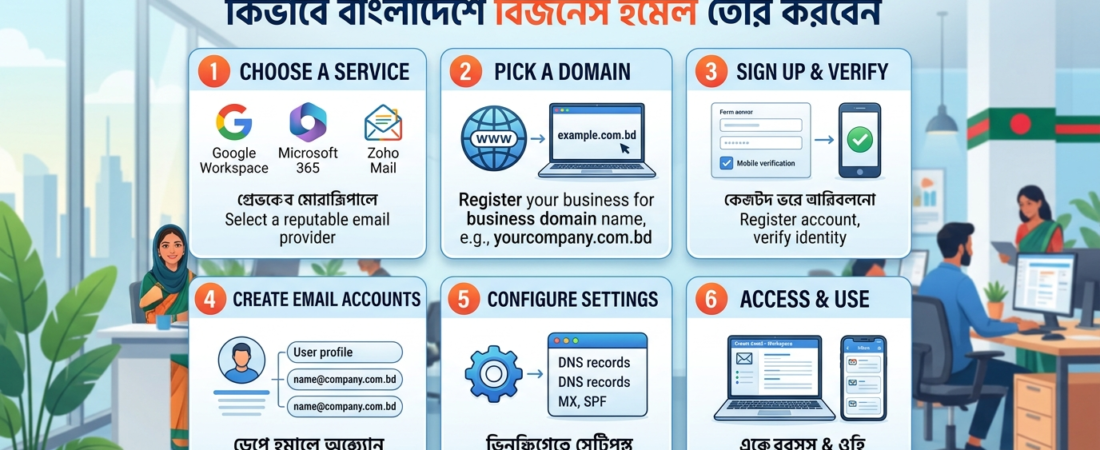
Still sending business proposals from a Gmail or Yahoo address? Here’s the hard truth — potential clients in Bangladesh notice that. A professional email like you@yourbusiness.com signals that your company is real, credible, and here to stay. A free generic address? It whispers the opposite.
If you’ve been wondering how to create business email in Bangladesh, you’re in exactly the right place. This guide walks you through everything — from choosing the right platform to going live with a custom business email — in plain, actionable steps.

Why a Business Email Address Matters in Bangladesh
Before diving into the setup, let’s talk about why this matters specifically in the Bangladeshi business landscape.
Bangladesh’s digital economy is growing fast. E-commerce, freelancing, and B2B services are booming — and competition is fierce. Whether you’re running a startup in Dhaka, a garments business in Chittagong, or a consultancy from home, how you present yourself online directly affects whether clients trust you.
Here’s what a professional business email does for you:
- Builds brand credibility — Clients take
info@yourcompany.comfar more seriously thanyourcompany2024@gmail.com - Protects against spam filters — Professional email providers improve deliverability significantly
- Keeps your communications organized — Separate team inboxes, departments, and roles
- Supports marketing campaigns — Better open rates when email looks trustworthy
- Scales with your team — Add employees with matching email addresses as you grow
What You Need Before Creating a Business Email
Getting started requires just two things:
- A domain name — e.g.,
yourcompany.com.bdoryourbrand.com - A business email hosting service — This is where your emails actually live
If you don’t have a domain yet, you’ll need to register one through a domain registrar. Bangladesh-based businesses often prefer .com.bd domains for local trust, though .com works globally.
Once your domain is ready, the next step is choosing your email hosting platform.
Step-by-Step: How to Create Business Email in Bangladesh
Step 1 — Choose Your Business Email Hosting Platform
This is the most important decision. The right platform affects reliability, storage, security, and support.
The most popular choices for businesses in Bangladesh include:
Google Workspace (formerly G Suite) The gold standard. You get Gmail’s familiar interface with your own domain, plus Google Drive, Meet, Calendar, and more. Ideal for teams already comfortable with Google tools.
Microsoft 365 (formerly Office 365) Great if your team uses Word, Excel, or Teams regularly. Comes with Outlook and deep Microsoft integration. Strong choice for corporate and enterprise environments.
Zoho Mail A budget-friendly option with a solid free tier for small teams. Works well for startups and SMEs in Bangladesh that want professional email without a big monthly bill.
cPanel / Web Hosting Email If you already have a web hosting plan (common in Bangladesh), your hosting provider may include email accounts for free via cPanel. Simple to set up — but limited in features and storage.
For most growing businesses in Bangladesh, Google Workspace offers the best balance of reliability, features, and value.
💡 Not sure which platform fits your business? Explore professional email solutions here — tailored for Bangladeshi businesses of all sizes.
Step 2 — Register Your Domain (If You Haven’t Already)
Your business email will live at your domain, so this step is non-negotiable. Choose a domain that:
- Matches your business name closely
- Is short and easy to spell
- Uses
.comfor international reach or.com.bdfor local trust
Popular domain registrars operating in Bangladesh include local hosting companies and international platforms like Namecheap or Google Domains.
Step 3 — Set Up Your Email Hosting Account
Once you have your domain, sign up with your chosen email hosting provider. During setup you’ll typically:
- Create your account on the platform
- Add your domain name for verification
- Choose how many email accounts you need
Most providers offer a free trial — take advantage of it before committing.
Step 4 — Verify Your Domain Ownership
This is a critical technical step that confirms you own the domain you’re setting up email for. Your email provider will give you a TXT record or CNAME record to add to your domain’s DNS settings.
Here’s the general process:
- Log in to your domain registrar or hosting control panel
- Navigate to the DNS management section
- Add the verification record your email provider gives you
- Wait 15–60 minutes for DNS propagation
- Return to your email provider and click “Verify”
This step trips up many users in Bangladesh — if you get stuck, contact a professional setup team who can handle DNS configuration for you.
Step 5 — Configure MX Records
MX (Mail Exchange) records tell the internet where to deliver emails sent to your domain. Without them configured correctly, your email simply won’t work.
Your email provider will give you a list of MX records to enter. These typically look something like:
| Priority | Mail Server |
|---|---|
| 1 | ASPMX.L.GOOGLE.COM |
| 5 | ALT1.ASPMX.L.GOOGLE.COM |
| 10 | ALT2.ASPMX.L.GOOGLE.COM |
Add each record in your DNS settings exactly as provided. DNS changes usually take effect within 1–24 hours.
Step 6 — Create Your Email Accounts
Now the fun part. Log in to your hosting dashboard and start creating email addresses:
info@yourbusiness.com— General inquiriessupport@yourbusiness.com— Customer serviceyourname@yourbusiness.com— Personal professional addresssales@yourbusiness.com— Sales team
Keep email addresses short, professional, and easy to remember. Avoid numbers or hyphens where possible.
Step 7 — Access and Test Your New Business Email
Once everything is configured, log in to your new inbox and send a test email to yourself or a colleague. Confirm:
- Incoming emails arrive correctly
- Outgoing emails land in inboxes (not spam folders)
- Your display name shows properly in sent messages
If you spot any issues, double-check your MX records and DNS settings. Most problems come down to a typo in one of the records.
Best Practices for Using Business Email in Bangladesh
Setting up the email is only half the job. Using it well is where the real value kicks in.
Use a professional signature — Include your name, title, company name, phone number, and website. This builds credibility with every email you send.
Enable two-factor authentication (2FA) — Email accounts are a top target for hackers. Protect yours with 2FA from day one.
Set up email forwarding thoughtfully — Forward important accounts to the right team members so nothing slips through the cracks.
Create email aliases — Instead of creating separate accounts for every role, use aliases like hello@ or billing@ that forward to your main inbox.
Keep your inbox organized — Use labels, folders, and filters from the start. A cluttered inbox leads to missed opportunities.
Common Mistakes to Avoid
Even experienced users make these errors when setting up business email in Bangladesh:
- Skipping DNS verification — Your email won’t work properly without correctly configured MX and SPF records
- Using weak passwords — Business emails contain sensitive data; treat them like a bank account
- Ignoring DKIM/SPF/DMARC settings — These email authentication standards prevent your emails from being flagged as spam
- Forgetting backup/recovery options — Always link a recovery phone number or secondary email
- Not creating a backup of old emails — Before migrating from a personal account, export your important emails
How Much Does Business Email Cost in Bangladesh?
Pricing varies widely depending on your choice:
| Platform | Starting Price (per user/month) |
|---|---|
| Google Workspace Starter | ~$6 USD |
| Microsoft 365 Business Basic | ~$6 USD |
| Zoho Mail (paid) | ~$1 USD |
| cPanel Hosting Email | Often free with hosting |
For small businesses in Bangladesh on a budget, Zoho Mail or cPanel email offers a cost-effective entry point. As your business scales, upgrading to Google Workspace or Microsoft 365 is well worth the investment.
Need Help Setting Up Your Business Email?
If all this sounds technical and time-consuming — that’s because it can be, especially if you’re new to DNS settings and domain configuration. Many business owners in Bangladesh prefer to hand this off to professionals and focus on what they do best: running their business.
Web All Rounder offers complete business email setup services in Bangladesh — from domain registration and DNS configuration to full Google Workspace and Microsoft 365 setup. Whether you need one inbox or fifty, they handle everything so you don’t have to.
Conclusion
Knowing how to create business email in Bangladesh is one of the smartest investments you can make in your brand. It costs very little but signals professionalism, trustworthiness, and seriousness to every client, partner, and vendor you communicate with.
The process comes down to five core steps: get a domain, choose a reliable hosting platform, verify your domain, configure your MX records, and create your inboxes. Done right, your business email will be up and running in under 24 hours.
Ready to get started?
👉 Explore business email setup packages at workspace.weballrounder.com
Or reach out directly on WhatsApp for a quick consultation: 📲 Chat with us on WhatsApp →
Last updated: May 2026 | Category: Business Tools, Digital Setup, Email Hosting Bangladesh